Keep your website. Add bookings to it.
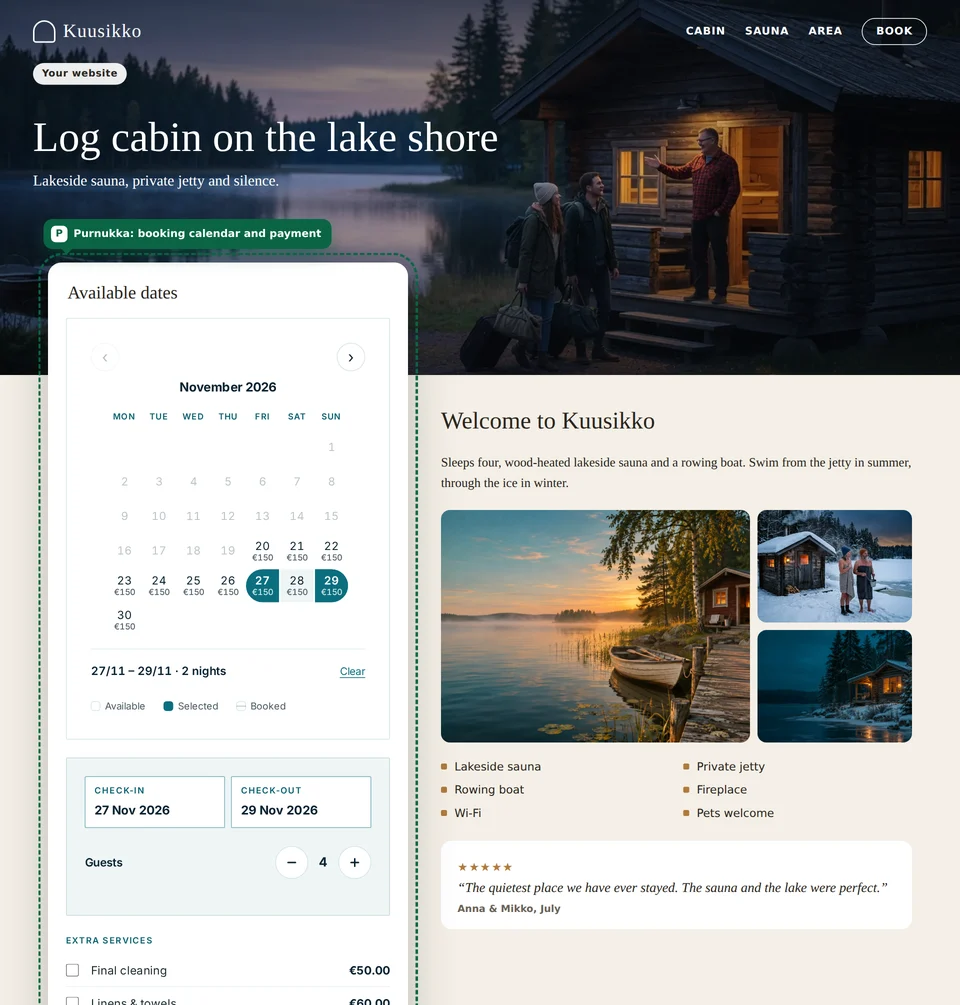
Already have a website that works? Paste two lines of code into it and guests see free dates and prices, then book and pay right on your site.
Payment methods




Two lines of code
Copy the code from Hub and paste it into your site. Instructions for WordPress, Wix, Squarespace and plain HTML.
Same calendar and prices
The same booking calendar as your Purnukka site: free dates, prices, add-ons and discount codes. A change in Hub shows in both right away.
Pay on Stripe, confirmation on your site
Payment opens on Stripe’s own payment page so the guest sees a secure address. After paying, the guest returns to your website, where the booking confirmation shows. The money goes to your own Stripe account.
Same price
No monthly fee. 3.5% of paid bookings, as on your Purnukka site. No extra charge for the embed.
Works on phones
The calendar adjusts its height to your page and works on phones. In Finnish or English.
Only on your websites
The calendar only shows on websites you have allowed in Hub. If someone else copies the code, the calendar is not shown.
Your website must use https. The look comes from your Purnukka booking page, not from your website theme.